

Harley-Davidson Boom! Box GTS
Headset Bypass Required
A headset bypass is required for any CarPlay, Android Auto or Media Box solution on Harley-Davidson screens.
Factory CarPlay is locked behind a paired headset — the head unit wants the headset's microphone, so it simply will not run without one paired. The USB port is restricted the same way, which is why a Piglet or a Media Box does nothing on a stock bike no matter what you plug in. A HogPlay headset bypass removes that requirement — CarPlay and the USB port both work without a headset paired. If you ride in a state where a helmet isn't required, that matters: a headset isn't a realistic answer on an open-face or bare-headed ride.
The Boom! Box GTS (2019-2026) is the factory head unit fitted to 133 model-years in our fitment database. 7 HogPlay parts are confirmed to work with it.
Parts that fit your Boom! Box GTS
CarPlay & Android Auto Media Boxes
 HogPlay Pro Media Box - Motorcycle CarPlay, Android Auto & Streaming for Harley-Davidson & Indian
 HogPlay Plus Media Box - Motorcycle Wireless CarPlay & Android Auto for Harley-Davidson & Indian
 HogPlay Media Box Special Edition (SE1) - Motorcycle Wireless CarPlay & Android Auto
 HogPlay Motorcycle Media Box - Wireless Apple CarPlay & Android Auto for Harley-Davidson & Indian
USB CarPlay & Android Auto Piglets
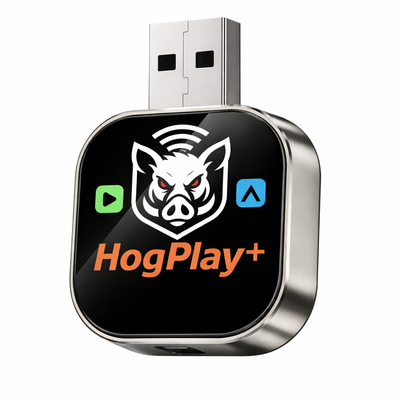 HogPlay Piglet Plus - Motorcycle Wireless CarPlay & Android Auto Adapter + Mini Media Box
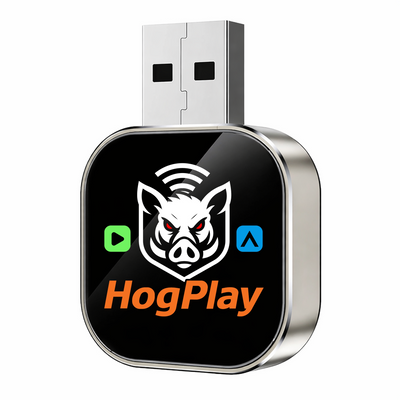 HogPlay Piglet - USB Wireless Apple CarPlay & Android Auto Adapter for Motorcycles
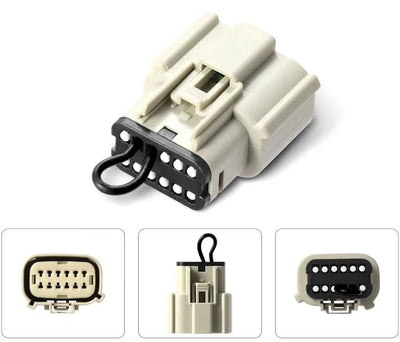
CarPlay Headset Bypass Adaptors
← All radios · All factory radios · Find parts by your bike →
What each part does
Bypass
Your Boom! Box GTS has the hardware for Apple CarPlay, but Harley-Davidson gates it behind a paired headset — the head unit wants the headset's microphone, and without one CarPlay will not run. The USB port is restricted the same way, so a Piglet or a Media Box does nothing on a stock bike. A HogPlay headset bypass plugs into the factory harness and removes that requirement: CarPlay and the USB port both work with no headset paired. If your state lets you ride without a helmet, that is the difference between using the system and not. No flashing, no dealer visit, and it is reversible — unplug it and the bike is stock.
USB Piglets
Once the bypass has opened the USB port, a USB Piglet adds Android Auto plus Mirror Link and AirCast screen mirroring — putting your phone's actual screen on the dash. No Harley factory screen has Android Auto on its own; the bypass and a Piglet are what add it.
Media Boxes
With the bypass in place, a Media Box adds Android Auto plus streaming — Netflix, YouTube, YouTube Music, podcasts and more — on the screen you already have. It even plays from an SD card or USB drive, so you are not burning phone data.
Not sure if your bike has the Boom! Box GTS?
Fitment depends on your exact year and model. Look your bike up by year, make and model and we'll tell you which radio it has and exactly what fits it.
Installation
Every HogPlay part on this page is plug-and-play into an existing connector — no cutting, no splicing, and no permanent modification to your bike. Unplug it and the motorcycle is back to stock. Fitment on this page is verified against the factory service documentation for this radio, not guessed from model names.
Frequently asked questions
What is the Harley-Davidson Boom! Box GTS?
The Boom! Box GTS is Harley-Davidson’s factory touring infotainment radio, fitted to Touring, CVO, and Trike models across model years 2019–2026. It runs a 6.5″ color touchscreen with factory navigation, SiriusXM, and AM/FM/Bluetooth audio, and it’s the radio the GTS Bypass is built to unlock.
Which Harley-Davidson Touring models come with the factory Boom! Box GTS?
The factory GTS shipped on standard non-trike Harley-Davidson Touring models — Street Glide, Road Glide, Road King, Electra Glide, and Ultra Limited — for model years 2019–2023, with 2024+ Touring bikes moving to the newer Skyline system. If your Touring bike falls in that 2019–2023 window, you have the factory GTS and a GTS Bypass is the right starting point.
Does my Harley-Davidson CVO have the GTS or the newer Skyline radio?
Harley-Davidson CVO models carried the Boom! Box GTS through the 2023.5 model year, then switched to Skyline. A 2023.5-or-earlier CVO Street Glide or Road Glide uses the GTS, so the GTS Bypass applies; anything newer runs Skyline and needs a different solution.
Do the Tri-Glide and Freewheeler trikes use the GTS radio?
Yes — Harley-Davidson Tri-Glide and Freewheeler trikes kept the Boom! Box GTS longer than the two-wheel lineup, running it through the 2025 model year before Skyline takes over for 2026. A 2019–2025 trike is a factory GTS bike, and the same GTS Bypass covers it.
How do I tell whether my radio is the GTS or the Skyline?
The GTS uses a 6.5″ touchscreen, while Skyline — introduced on select 2023.5 CVO models and 2024+ Touring bikes — uses a much larger 12.3″ display, roughly four times the screen area. If you’re looking at the smaller 6.5″ screen, you have the GTS, and the GTS Bypass is what unlocks it.
My 2024 Street Glide has the new Skyline system — does the GTS Bypass work on it?
No — the GTS Bypass is built for the Boom! Box GTS’s headset lock, and 2024+ non-CVO Touring models (along with 2023.5+ CVOs and 2026 trikes) moved to the newer Skyline radio, a different platform. If you’re on Skyline, the GTS Bypass isn’t the right part for your bike.
Is there one GTS Bypass for every year, or do I match it to my model year?
One SKU covers every factory Boom! Box GTS from 2019 through 2026 — standard Touring 2019–2023, CVO through 2023.5, and Tri-Glide or Freewheeler trikes through 2025 — so you don’t need to match the GTS Bypass to a specific model year.
Does the Boom! Box GTS have Apple CarPlay?
Yes — every factory Boom! Box GTS has Apple CarPlay built in, but there’s a catch: it only activates once a Bluetooth headset is paired to the radio. The GTS Bypass removes that requirement so CarPlay runs on its own.
More questions (28)
Why won’t my Boom! Box GTS turn on CarPlay?
The GTS gates factory Apple CarPlay and the USB port behind a paired Bluetooth headset — no headset connection, no CarPlay, even with your phone plugged in. The GTS Bypass tells the radio a headset is present, so CarPlay and the USB port work without one.
I ride in an open-face helmet with no headset — can I still use CarPlay on my GTS?
Not from the factory. The Boom! Box GTS won’t start CarPlay or open the USB port until a Bluetooth headset is paired, which leaves riders in an open-face helmet — or no helmet at all — with a factory CarPlay system they can’t actually use. The GTS Bypass unlocks CarPlay and USB with no headset required.
What exactly does the HogPlay GTS Bypass do?
It’s a small plug-in jumper that taps the GTS’s headset circuit and removes the paired-headset requirement, so factory Apple CarPlay and the USB port work the moment you plug in your phone. It doesn’t add Android Auto by itself — it opens the radio’s own CarPlay and USB so a Media Box or Piglet has something to plug into next.
My Harley-Davidson has an aftermarket head unit instead of the factory GTS — do I still need a bypass?
No. The headset lock is unique to the factory Boom! Box GTS. Aftermarket units from brands like SoundStream, Rockford Fosgate, Boss, Diamond Audio, and Aquatic AV run their own CarPlay with no bypass needed — see the full aftermarket radios lineup.
My 2014–2018 Harley-Davidson Touring model — does it have the GTS and factory CarPlay?
No. The 2014–2018 Touring lineup ran the Boom! Box 4.3 or 6.5GT radio, which never had factory Apple CarPlay — the GTS and its CarPlay didn’t arrive until the 2019 model year. A bypass alone does nothing on a 14–18 bike because there’s no factory CarPlay behind it yet.
Can I add the Boom! Box GTS and its CarPlay to my 2014–2018 Harley-Davidson?
Yes — owners of 2014–2018 Touring models can retrofit a 2019+ Boom! Box GTS radio, which brings genuine factory Apple CarPlay with it. Once the GTS is in, the headset lock shows up exactly as it does on a factory 2019+ bike, so you’ll still want the GTS Bypass to run it without a paired headset.
I don’t want to swap in a GTS radio — what are my CarPlay options on a 2014–2018 Harley-Davidson?
Instead of retrofitting the factory GTS, you can fit an aftermarket CarPlay head unit built for your Touring bike — no bypass needed, since aftermarket units carry no headset lock. Browse the aftermarket radios hub or go straight to a brand like SoundStream, Rockford Fosgate, Boss, Diamond Audio, or Aquatic AV.
Does the Boom! Box GTS have Android Auto?
Not from the factory — the Boom! Box GTS ships with Apple CarPlay only. Android Auto comes after the GTS Bypass opens the USB port: plug in a Media Box or a Piglet and Android Auto runs through your existing GTS screen.
I already did the GTS Bypass — why isn’t Android Auto working yet?
Media Box or Piglet — which one do I need for Android Auto?
Can I stream Netflix or YouTube on my Harley-Davidson touring radio?
Yes — that’s the Media Box’s territory. Once the GTS Bypass opens the USB port on your GTS-equipped bike, the Media Box adds Netflix, YouTube, YouTube Music, and podcasts right alongside Android Auto.
Does Android Auto through the Media Box or Piglet burn my phone’s data plan?
Android Auto itself still routes through your phone’s connection, but the Media Box plays music and video straight off an SD card or USB drive, so your own library isn’t pulling cellular data every mile — a real advantage if you load your own media instead of streaming everything.
What’s the difference between Mirror Link and Android Auto on the Piglet?
Android Auto shows Google’s ride-focused interface — maps, calls, messages, music — while Mirror Link (and AirPlay for iPhone) mirrors your phone’s actual screen onto the GTS display. The Piglet gives you both, so you can switch to whichever view suits the app you’re running.
I ride a 2014–2018 Harley-Davidson with no GTS radio — can I still get Android Auto?
Yes. Retrofit a 2019+ Boom! Box GTS radio, run the GTS Bypass to open its USB port, then add a Media Box or Piglet — or skip the factory route entirely with an aftermarket head unit from the aftermarket radios hub that has Android Auto built in and needs no bypass.
Will I lose my factory navigation or SiriusXM if I install the GTS Bypass?
No — the GTS Bypass only removes the paired-headset lock on CarPlay and the USB port. Your Boom! Box GTS keeps its factory navigation, SiriusXM, and AM/FM/Bluetooth audio exactly as they were.
Do I keep my factory look and handlebar controls after adding a bypass and Media Box or Piglet?
Yes — the GTS Bypass and a Media Box or Piglet all run through the factory GTS screen and handlebar switches, so your Harley-Davidson keeps its stock dash appearance and controls with nothing permanently modified.
Is the GTS Bypass installation reversible?
Yes — the GTS Bypass is a plug-in module that connects into the factory GTS wiring without cutting or re-flashing anything, so it can be removed and the bike returned to stock if you ever sell or service it.
How complicated is the install for the GTS Bypass?
It’s a plug-and-play job behind the fairing on any GTS-equipped Harley-Davidson — the GTS Bypass harness connects in place of the factory jumper, with no cutting or splicing required.
Can I still use my Boom! Audio headset after installing the bypass?
Yes — the GTS Bypass only removes the requirement to pair a headset before CarPlay and the USB port activate. If you still like to ride with a paired Boom! Audio headset, you can; the bypass just stops it from being mandatory.
Will installing a bypass affect my Harley-Davidson’s factory warranty?
The GTS Bypass is a removable, non-destructive plug-in harness rather than a permanent change to the radio, which is why many riders prefer it to cutting into factory wiring — if warranty is a concern, a dealer can simply unplug it before a service visit.
Should I keep the factory GTS radio and add a bypass, or switch to an aftermarket head unit?
If you like the factory look, handlebar controls, and navigation your Harley-Davidson already came with, the GTS Bypass is the cleaner, cheaper path — it unlocks the CarPlay and USB port you already paid for. Swapping to an aftermarket unit from the aftermarket radios hub makes more sense if you want a bigger screen or wireless CarPlay and don’t mind losing the factory face.
Is the GTS Bypass worth it if I ride a Street Glide or Road Glide with an open-face helmet?
Yes — on a 2019–2023 Street Glide or Road Glide, factory CarPlay only wakes up with a paired headset, so an open-face rider is locked out entirely. The GTS Bypass removes that lock so CarPlay and the USB port work whether or not you’re wearing comms — for many riders that alone is the whole reason to fit it.
How does keeping the GTS with a bypass compare on resale versus cutting the dash for an aftermarket radio?
The GTS Bypass leaves the factory Boom! Box GTS in place with nothing permanently modified, so the bike still shows and sells as stock. An aftermarket head unit from a brand like SoundStream or Rockford Fosgate may look and sound better, but it’s a visible, harder-to-reverse swap a future buyer might not want.
What does keeping the GTS actually cost me versus going aftermarket?
A GTS Bypass plus a Media Box or Piglet is typically a fraction of what a full aftermarket head unit and its install run, and you keep the factory navigation and stereo tuning your Harley-Davidson came with.
On a long touring trip, is the factory GTS sound and navigation still good enough after the bypass?
Yes — the bypass doesn’t touch the GTS’s factory navigation, SiriusXM, or amplifier; it only opens CarPlay and the USB port. For an open-face rider covering real miles that’s often the whole fix, and a Media Box loaded with an SD card adds offline music and video for camp stops without burning phone data.
Can I use CarPlay video or Netflix while I’m actually riding?
No — CarPlay video and streaming apps like Netflix or YouTube on a Media Box are parked-only, the same as in a car; they lock out video while the bike is moving. Navigation, audio, and voice commands still work fine underway.
On a group ride, does the bypass make it easier to glance at directions without a headset?
Yes — that’s exactly what the GTS Bypass is built for: no headset paired, no intercom group, just the CarPlay map on the dash where you can glance at it. It’s a common reason riders fit it before group rides on a Street Glide, Road Glide, or CVO Touring bike.
Is it worth doing the bypass on an older Harley I’m keeping long-term versus trading in?
If you’re keeping a 2019–2023 Touring or CVO, or a trike through 2025, the one GTS Bypass SKU pays for itself in headset-free CarPlay over years of riding. If you plan to trade in soon, it’s worth knowing the bypass leaves the bike stock, with nothing to undo first.
Ride safe: on-screen video is for parked viewing only — never watch video while the motorcycle is in motion. Music, audio and navigation are made for the road.
